
Searching for the Best Google Workspace Alternatives for your team or business? 💼
If yes, you are in the right place. ✅
While Google Workspace is popular, it may not suit every workflow, budget, or security need. Many teams now look for tools that offer deeper collaboration, stronger privacy, offline flexibility, or all-in-one productivity features.
In this article, we’ll cover the Best Google Workspace Alternatives, including Microsoft 365, Zoho Workspace, Proton Suite, ONLYOFFICE, ClickUp, and Notion.

🚀 Get Up to 40% Off on Proton Business Suite!
Secure your business data and boost productivity with Proton’s encrypted Business Suite. Enjoy up to 40% off on annual subscriptions and get full access to Proton Mail, Drive, Calendar, Docs, and more while keeping your team safe and productive!
Each option serves a different type of user from enterprises and remote teams to privacy-focused professionals helping you find the right productivity suite for your needs. 🚀
#1. Microsoft 365 🏆
Microsoft 365 is an all-in-one productivity suite designed to help individuals, teams, and organizations work smarter from anywhere.
It brings together familiar apps like Word, Excel, PowerPoint, Outlook, and Teams into a single, connected ecosystem, making it easy to create, share, and collaborate in real time.
Key Features of Microsoft 365
- All-in-One Productivity Apps
Microsoft 365 includes Word, Excel, PowerPoint, Outlook, and Teams in one unified ecosystem. Users can create documents, spreadsheets, and presentations effortlessly. Everything stays connected across desktop, web, and mobile devices. - Copilot AI Assistance
Microsoft 365 Copilot uses AI to help write content, analyze data, summarize emails, and generate presentations. It works directly inside your apps, saving time and boosting productivity. Enterprise-grade data protection keeps your information secure.

- Seamless Team Collaboration
Teams, shared documents, and real-time co-authoring make collaboration smooth and efficient. Team members can chat, meet, and work on files together from anywhere. Updates, comments, and tasks stay perfectly in sync. - Cloud Storage with OneDrive
OneDrive allows users to securely store, organize, and access files from any device. Automatic syncing ensures your latest work is always available. Built-in sharing controls make collaboration safe and simple. - Cross-Platform Access & Security
Microsoft 365 works across Windows, macOS, iOS, Android, and web browsers. Advanced security features protect data with compliance, encryption, and access controls. Ideal for businesses, students, and remote teams alike.
Pricing Plans of Microsoft 365 💰

- Microsoft 365 Free: Get free access to essential Microsoft apps and cloud storage, perfect for home users to stay productive without cost.
- Microsoft 365 Basic ($19.99/year): Enjoy online protection and cloud storage tailored for one person, offering essential security and accessibility at an affordable price.
- Microsoft 365 Personal ($99.99/year): Full access to Microsoft 365 apps with advanced online protection and cloud storage for one user, ideal for personal productivity.
- Microsoft 365 Family ($129.99/year): Share Microsoft 365 apps, protection, and cloud storage across up to six people, perfect for families or small groups staying connected and productive.
Pros & Cons of Microsoft 365 📈
| Pros | Cons |
|---|---|
| Seamless integration with Microsoft apps like Word, Excel, and Teams | Subscription pricing can be expensive for small teams |
| Robust cloud storage with OneDrive and automatic syncing | Learning curve for users unfamiliar with Microsoft ecosystem |
| Advanced security and enterprise-grade data protection | Some advanced features locked behind higher-tier plans |
| AI-powered tools like Microsoft 365 Copilot for productivity | Offline functionality depends on app installation and licenses |
| Flexible plans suitable for individuals, families, and enterprises | |
| Cross-device access with web, desktop, and mobile apps | |
| Regular updates ensure new features and performance improvements |
#2. Zoho Workspace 💻
Zoho Workspace is an all-in-one enterprise email and collaboration suite designed to enhance team productivity and communication. Made in India, it brings together email, chat, video conferencing, cloud storage, and office tools into a single unified platform.
It allows teams to create, share, and manage documents, spreadsheets, and presentations seamlessly with integrated collaboration apps like Zoho WorkDrive, Writer, Sheet, and Show.
Key Features of Zoho Workspace ✨
- Unified Communication
Zoho Workspace combines email, chat, video conferencing, and calling in a single platform. Teams can stay connected on any device, whether working from home or office. This ensures smooth communication without switching between multiple apps. - Collaborative Office Suite
Create, share, and manage documents, spreadsheets, and presentations with apps like Zoho Writer, Sheet, and Show. Real-time collaboration allows multiple users to co-edit files efficiently. Integrated workflows reduce the need for constant emailing back and forth.

- Secure Cloud Storage
WorkDrive provides centralized, secure storage for all your files. Access files anytime, anywhere, with support for offline use and robust privacy controls. Enterprise-grade security features like MFA and SSO keep your data safe. - Employee Engagement Tools
Zoho Workspace includes tools like Zoho Connect for forums, live events, and peer recognition. These features help boost collaboration, employee engagement, and morale. Teams can celebrate achievements and share updates in one place. - Easy Migration & Microsoft Compatibility
Zoho offers built-in migration tools to move emails, contacts, and calendars from Microsoft 365 or Google Workspace. Its office apps are fully compatible with Microsoft Office files, ensuring a smooth transition. This minimizes disruption during adoption.
Pricing Plans of Zoho Workspace 💰
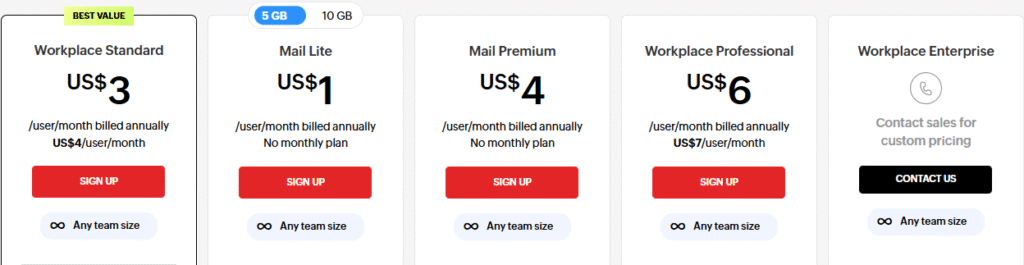
- Mail Lite – $1/user/month
Perfect for small teams, offering enterprise-grade email with 5 GB mail storage per user. Access essential communication tools like Calendar, ToDo, and Zoho Directory. - Workplace Standard – $3/user/month
Includes 30 GB mail storage per user and 100 GB team file storage. Comes with collaborative office apps, AI assistant Zia, and unified communication tools. - Mail Premium – $4/user/month
Provides 50 GB mail storage plus 50 GB retention per user. Adds advanced features like email retention, eDiscovery, S-MIME, and mobile access management. - Workplace Professional – $6/user/month
100 GB mail storage per user and 1 TB team file storage. Offers full collaboration suite, intranet, employee engagement tools, and enhanced security features. - Workplace Enterprise – Contact Sales
Customizable plans with highest limits for mail, storage, and apps. Includes virtual private cloud, endpoint controls, identity management, and extra enterprise-grade security.
Pros & Cons of Zoho Workspace 🌟
| Pros | Cons |
|---|---|
| Comprehensive suite covering email, docs, chat, and meetings | Advanced features may be overwhelming for beginners |
| Affordable pricing with flexible mix-and-match plans | Some tools have limited integrations compared to bigger competitors |
| AI assistant Zia boosts productivity and automation | Migration from other platforms may require learning curve |
| Strong security features including SSO, MFA, and encryption | |
| Cross-platform apps for desktop, web, and mobile devices | |
| Easy migration tools from Microsoft 365 and Google Workspace | |
| Excellent collaboration with team folders, chat, and video conferencing |
#3. Proton Suite
Proton Suite is a privacy-focused productivity and security platform designed to give users full control over their data. Built with end-to-end encryption, it ensures that your emails, files, calendars, passwords, and other online activities remain completely private.
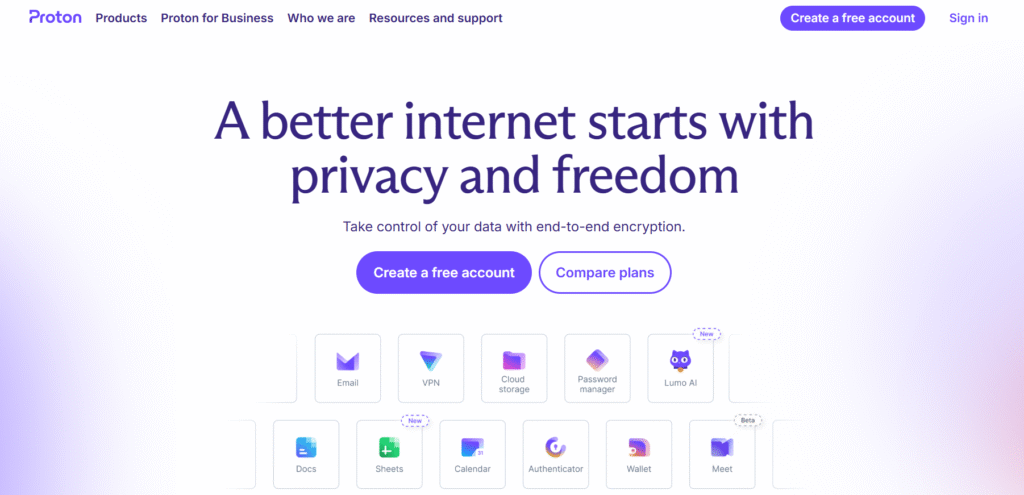
The suite includes Proton Mail, Proton Calendar, Proton Drive, Proton Docs, Proton Sheets, Proton VPN, Proton Pass, Proton Authenticator, and Lumo AI, offering a complete ecosystem for secure communication, collaboration, and data management.
Key Features of Proton ✨
- End-to-End Encrypted Email (Proton Mail)
Protects your emails with advanced end-to-end encryption, ensuring that only you and the recipient can read your messages. No ads, no tracking, and full privacy by default. Ideal for secure personal and business communication. - Secure Cloud Storage (Proton Drive)
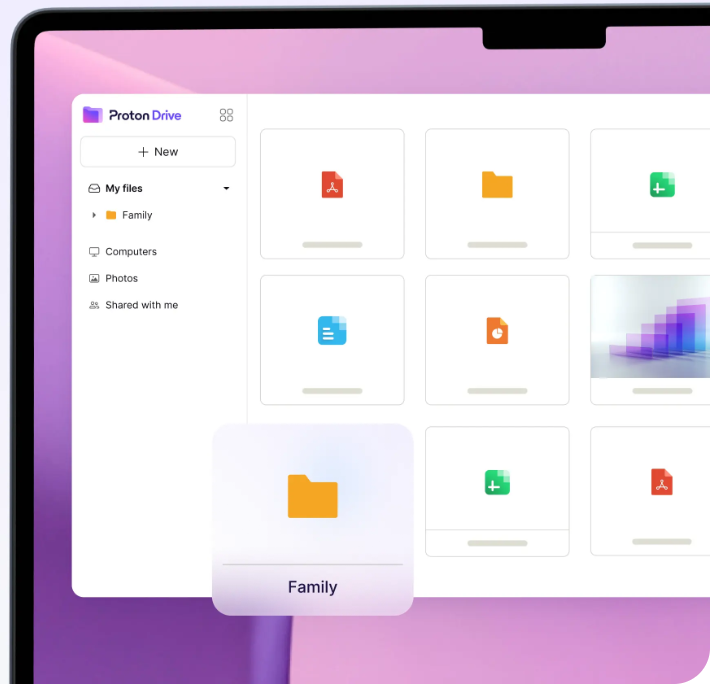
Store, share, and collaborate on files with complete encryption. Proton Drive safeguards your documents, photos, and sensitive data from hackers and unauthorized access. Access your files across all devices securely.
- Privacy-Focused Productivity Tools (Proton Docs & Sheets)
Create and edit documents and spreadsheets collaboratively without compromising privacy. All data is encrypted, keeping sensitive business or personal information safe. Works seamlessly across devices. - Integrated Security Suite (VPN, Pass & Authenticator)
Browse privately with Proton VPN, manage passwords with Proton Pass, and secure accounts with Proton Authenticator. Together, they provide a fully encrypted ecosystem to protect your online presence. - AI Assistance with Privacy (Lumo AI)
Leverage AI-powered productivity tools while keeping your data private. Unlike other AI solutions, Lumo ensures conversations and inputs are encrypted and never used for profiling or ads.
Pricing Plans of Proton 💰
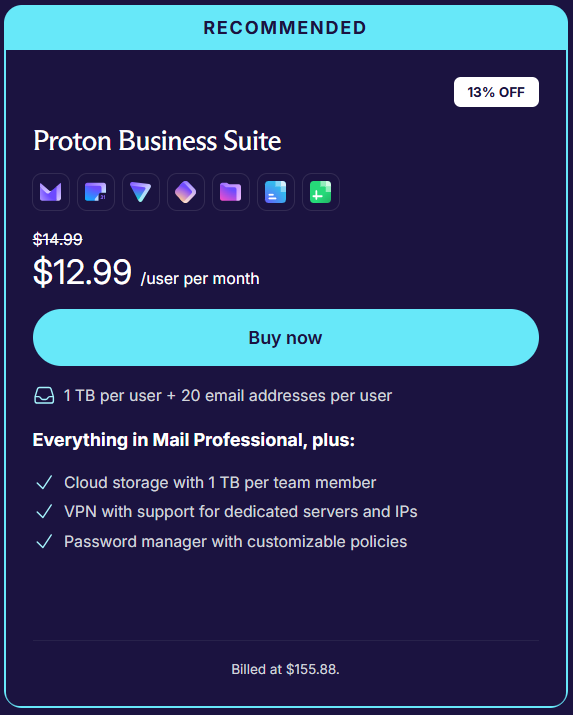
Proton Business Suite – $12.99/user per month: Get 1 TB of cloud storage per user and up to 20 email addresses per user. This plan includes everything in the Mail Professional tier plus advanced features like VPN support with dedicated servers and IPs. Additionally, enjoy a powerful password manager with customizable security policies for your business.
Pros & Cons of Proton 🎯
| Pros | Cons |
|---|---|
| End-to-end encryption protects your data from everyone, including Proton. | Free tier has limited storage and features. |
| Swiss privacy laws provide strong legal protection for your data. | Advanced security features can be complex for casual users. |
| Open-source apps audited by security experts for full transparency. | Some integrations and third-party app support are limited. |
| One account gives access to email, VPN, calendar, cloud storage, and more. | Premium plans can be pricier compared to mainstream providers. |
| Automatic encryption is seamless and easy to use for all skill levels. | |
| No ads or data selling — privacy is fundamental, not optional. | |
| Supports cross-device sync across multiple operating systems. |
#4. ClickUp
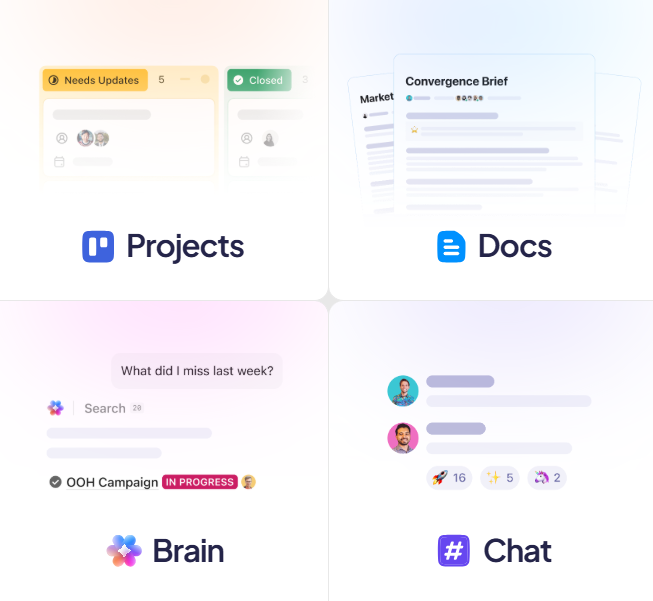
ClickUp is an all-in-one productivity and project management platform designed to help teams and businesses streamline work. It combines tasks, projects, documents, spreadsheets, calendars, goals, and AI-powered assistants in a single platform.
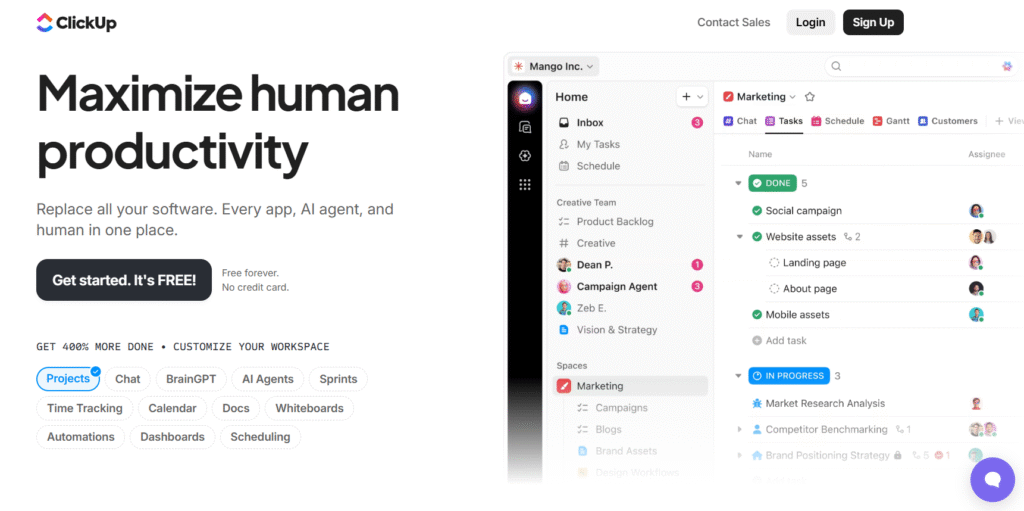
ClickUp allows teams to manage workflows, automate repetitive tasks, and collaborate efficiently, replacing multiple tools with one integrated solution.
Key Features of ClickUp
- All-in-One Workspace
ClickUp combines tasks, projects, docs, goals, calendars, and more in a single platform. This reduces the need for multiple tools, helping teams stay organized and focused. Everything you need to manage work is accessible in one place. - Customizable Workflows
With over 100 features, ClickUp lets you create workflows that fit your team’s unique needs. You can use templates, custom fields, automations, and dashboards to streamline processes and save time. Flexibility ensures your team works the way it wants.
- AI-Powered Productivity
ClickUp Brain and AI agents automate repetitive tasks, answer questions, and even draft content. Teams can save hours daily, get insights faster, and focus on high-value work instead of manual processes. - Advanced Project Tracking
Track tasks, milestones, and dependencies with multiple views like Kanban, Gantt, Timeline, and Calendar. This makes it easy to monitor progress, identify bottlenecks, and ensure projects are delivered on time. - Collaboration & Communication
ClickUp allows team members to comment, assign tasks, share files, and set priorities in real-time. Notifications, reminders, and integrated chat help keep everyone aligned, boosting teamwork and reducing miscommunication.
Pricing Plans of ClickUp 💰

- Free Forever Plan
Perfect for individuals or small teams, this plan offers unlimited tasks, 60MB storage, basic boards, and collaborative docs. It’s completely free with 24/7 support to get started immediately. - Unlimited Plan ($7/user/month, billed yearly)
Unlock unlimited storage, folders, integrations, Gantt charts, and custom fields. This plan also includes native time tracking, goals, portfolios, and AI compatibility for growing teams. - Business Plan ($12/user/month, billed yearly)
Designed for teams that need advanced project tracking and reporting. Get unlimited dashboards, timelines, whiteboards, automation integrations, workload management, and private boards.
Pros & Cons of ClickUp 🎯
| Pros | Cons |
|---|---|
| All-in-one platform combining tasks, docs, calendars, and AI features. | Learning curve can be steep for new users. |
| Highly customizable workflows and templates for any team. | Mobile app can feel cluttered for smaller screens. |
| AI-powered ClickUp Brain and Super Agents save hours daily. | Some advanced features require higher-tier plans. |
| Supports multiple views: Kanban, Gantt, Timeline, Calendar, Whiteboards. | Occasional performance lag with very large projects. |
| Unlimited integrations with apps like Slack, Google Drive, Jira, and more. | |
| Advanced reporting, dashboards, and workload management for teams. | |
| Trusted by millions of users with 24/7 support and enterprise-grade security. |
#5. ONLYOFFICE
ONLYOFFICE is a powerful, AI-enhanced office suite designed for document creation, editing, and collaboration. It offers tools to work seamlessly on documents, spreadsheets, presentations, and PDFs with advanced AI assistants to speed up workflows.
With features like real-time co-editing, chat, audio/video calls, and secure file sharing, ONLYOFFICE provides an all-in-one solution for businesses and individuals to create, collaborate, and communicate efficiently across devices.
Key Features of ONLYOFFICE 🌟
- Comprehensive Document Editing
ONLYOFFICE allows you to create, edit, and collaborate on documents, spreadsheets, and presentations in one platform. It supports PDF editing, Markdown/HTML conversion, and fillable forms. This makes it a complete solution for all your office productivity needs. - Real-Time Collaboration
Work simultaneously with your team using real-time co-editing, commenting, and mentions. Track changes, compare documents, and manage versions efficiently. Communication is seamless with built-in chat, audio, and video calls.
- AI-Powered Assistance
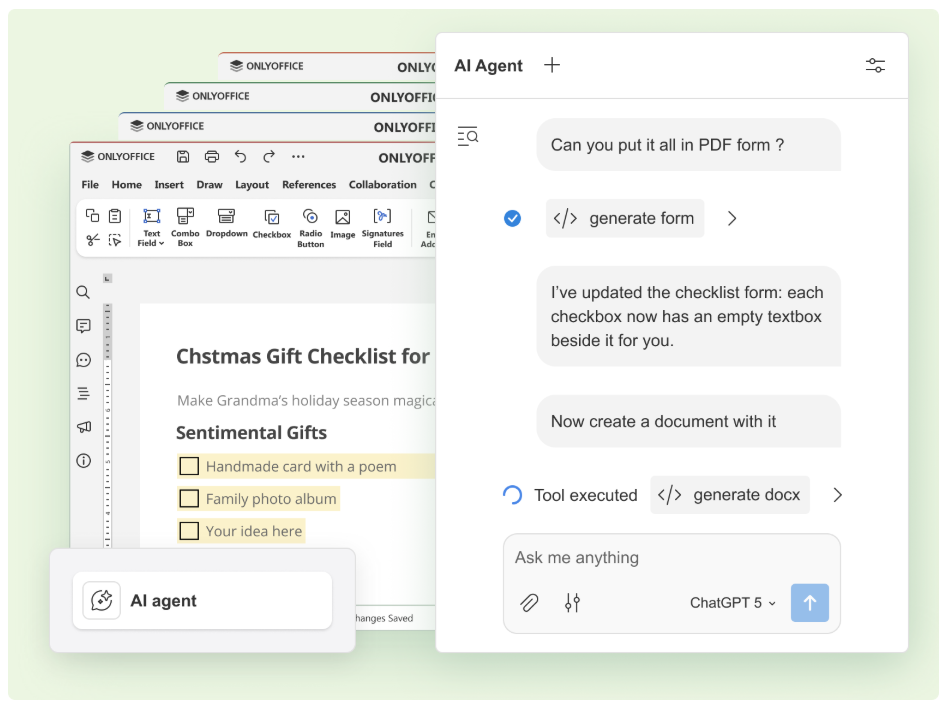
ONLYOFFICE integrates AI agents and smart assistants to enhance workflows. They help generate content, check grammar and spelling, extract text from PDFs, and provide quick answers. Users can connect any AI model, even fully local ones, for maximum efficiency. - Secure and Private
ONLYOFFICE prioritizes data security with three levels of encryption: at rest, in transit, and end-to-end. Advanced access controls and local AI model support ensure sensitive information stays safe. Open-source code allows transparency and security auditing. - Cross-Platform Accessibility
ONLYOFFICE works on desktops, mobile devices, and in the cloud. You can integrate it with 40+ apps like Moodle, Nextcloud, and WordPress, or use it in your private DocSpace. Offline editing is also supported, making it flexible for any work environment.
Pricing Plans of ONLYOFFICE 💰
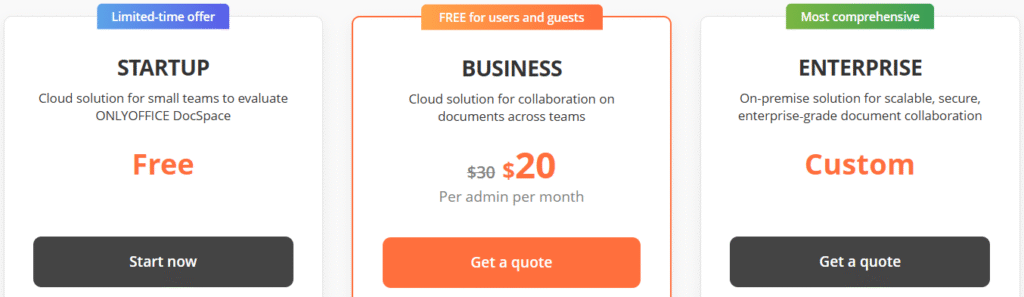
- Startup Plan (Free)
Ideal for small teams to explore ONLYOFFICE DocSpace with up to 3 admins. Includes 2 GB file storage, 12 rooms, and unlimited users and guests. - Business Plan ($20 per admin/month)
Designed for team collaboration with 250 GB per admin, unlimited rooms, and full customization options. Includes branding, SSO, backups, and third-party integrations. - Enterprise Plan (Custom Pricing)
A scalable on-premise solution for enterprises needing unlimited users, rooms, and admins. Offers multi-space management, SLA support, branding, SSO, and automatic backup & recovery.
Pros & Cons of ONLYOFFICE 🎯
| Pros | Cons |
|---|---|
| Complete office suite: Docs, Sheets, Slides, PDFs, and e-books. | Some advanced features require paid plans. |
| AI-powered assistants for faster workflows. | Cloud plans have storage limits per admin. |
| Supports real-time collaboration and co-editing. | On-premise setup can be complex for small teams. |
| Cross-platform apps: Windows, macOS, Linux, iOS, Android. | Some integrations require technical setup. |
| Secure with 2FA, SSO, and multi-level encryption. | |
| Customizable rooms, branding, and access rights. | |
| Supports both cloud and on-premise deployment. |
#6. Notion 📈
Notion is an all-in-one workspace where teams and AI agents can capture knowledge, manage projects, and automate repetitive tasks.
It combines tools like notes, calendars, project management, and AI-powered assistants into a single platform, helping small teams feel as productive as much larger ones.
Key Features of Notion ✨
- All-in-One Workspace
Notion combines notes, tasks, databases, calendars, and wikis in a single platform. Teams no longer need multiple apps, making work simpler and more organized. Everything your team needs is accessible in one place. - AI-Powered Notion Agents
Notion’s AI agents handle repetitive tasks, draft content, and summarize information. This saves time and reduces manual work, helping teams focus on high-priority projects. It personalizes suggestions based on your workflow.

- Flexible Project Management
Create boards, timelines, and task lists to manage projects of any size. Customize workflows to fit your team’s needs and track progress in real time. Notion helps ensure deadlines are met efficiently. - Centralized Knowledge Management
Store and organize all your documents, wikis, and files in one searchable hub. Teams can quickly find information, reducing lost context and improving collaboration. It’s perfect for onboarding and cross-team knowledge sharing. - Customizable Templates & Automation
Notion offers hundreds of ready-made templates and automation tools. You can automate repetitive tasks, streamline processes, and save hours each week. It adapts to any team or project style effortlessly.
Pricing Plans of Notion 💰
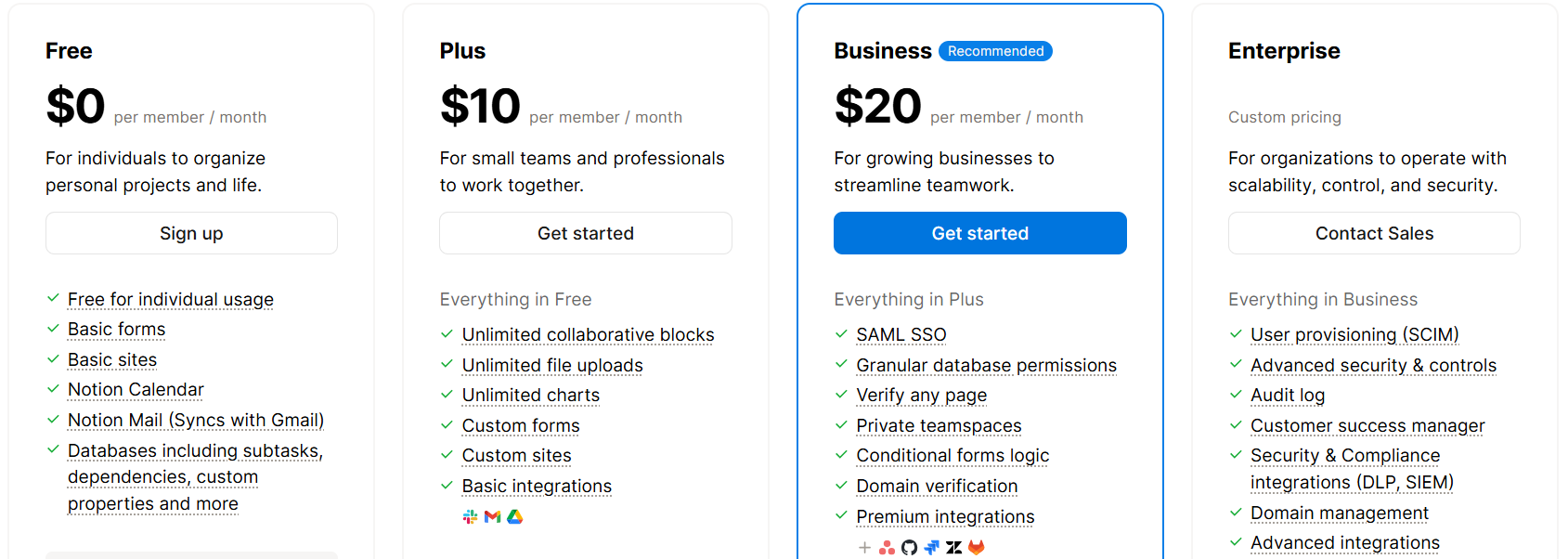
- Free Plan – $0 per user/month
- Ideal for individuals organizing personal projects and life.
- Includes basic templates, Notion Mail syncing with Gmail, and 5MB file uploads.
- Plus Plan – $10 per user/month
- Designed for small teams and professionals to work collaboratively.
- Includes unlimited file uploads, unlimited charts, and basic integrations.
- Business Plan – $20 per user/month
- Recommended for growing businesses to streamline teamwork.
- Offers advanced features like SAML SSO, granular database permissions, and premium integrations.
- Enterprise Plan – Custom Pricing
- Tailored for organizations needing scalability, control, and security.
- Provides advanced security, audit logs, and a customer success manager.
Pros & Cons of Notion 📊
| Pros | Cons |
|---|---|
| Combines tasks, notes, calendars, and databases in a single platform | May take time to get used to for beginners |
| AI agents handle routine work, saving significant time | Offline features are somewhat limited |
| Offers flexible project management with boards, timelines, and task tracking | Can feel complex for smaller projects |
| Keeps team knowledge organized and accessible | Mobile app misses some advanced functionalities |
| Custom templates and automation enhance productivity | |
| Facilitates collaboration and knowledge sharing across teams | |
| Scales easily for individuals, small teams, and large enterprises |
Which Is Best Google Workspace Alternative? 👌
If you’re looking for a reliable alternative to Google Workspace, several options are worth considering, including Zoho Workplace, ONLYOFFICE, Proton Suite, ClickUp, and Microsoft 365. Each comes with unique features, pricing, and privacy standards, so the choice depends on your specific needs.

Why Microsoft 365 Is The Winner? 🥇
Microsoft 365 is a top choice for businesses and individuals who need a professional, fully integrated office suite. It provides familiar tools like Word, Excel, PowerPoint, Outlook, OneDrive, and Teams, making it easy to adopt while enhancing productivity across daily tasks.
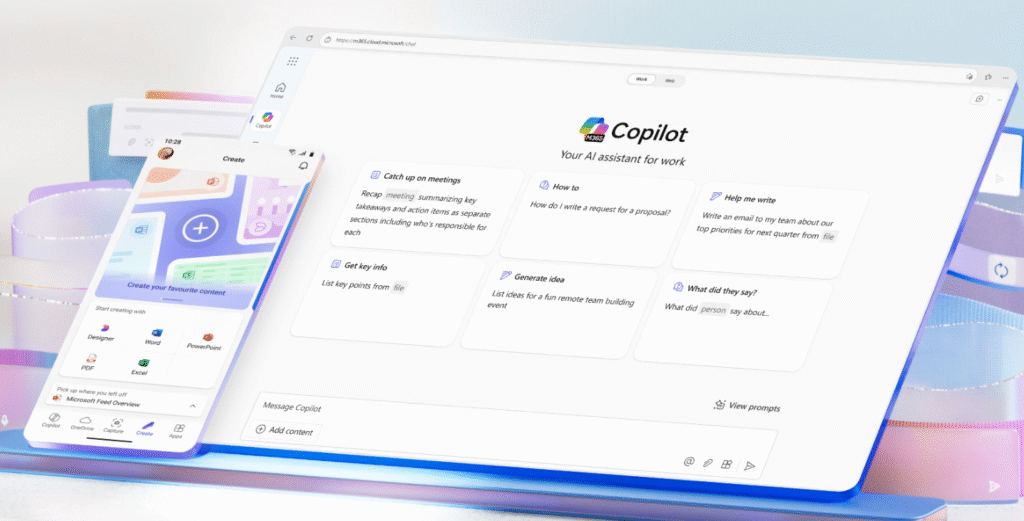
Collaboration and accessibility are seamless with Microsoft 365. Teams can co-author documents in real time, hold video or chat meetings, and share resources via SharePoint, all while accessing files across Windows, Mac, iOS, Android, and the web.
While other alternatives like Zoho or ONLYOFFICE offer competitive features and lower costs, Microsoft 365 combines reliability, familiarity, security, and advanced tools, making it the most complete and professional solution for replacing Google Workspace.
Conclusion 🔥
Choosing the right alternative to Google Workspace depends on your priorities whether it’s cost, security, collaboration features, or AI-powered productivity. While several options like Zoho, ONLYOFFICE, ClickUp, and Proton offer unique advantages, Microsoft 365 clearly stands out for its reliability, comprehensive toolset, and seamless collaboration.

For businesses and professionals seeking a familiar, secure, and scalable platform, Microsoft 365 not only matches but often exceeds what Google Workspace offers. Its advanced AI tools and cross-platform support make it a future-ready solution for teams of any size.
Ultimately, if you want a trusted all-in-one productivity suite that balances performance, security, and innovation, Microsoft 365 is the go-to choice.
FAQs 📢
Yes, Microsoft 365 provides migration tools that help you move emails, documents, and calendars smoothly from Google Workspace.
Absolutely. Most alternatives like Microsoft 365, Zoho, and ONLYOFFICE offer plans tailored for small teams and startups.
Yes. Microsoft 365, ClickUp, and ONLYOFFICE have AI assistants and automation features to boost productivity.
Proton stands out for privacy, with end-to-end encryption and strict data protection policies.
Yes, all major alternatives—including Microsoft 365, ONLYOFFICE, and ClickUp—offer mobile apps for Android and iOS.