
Is your website traffic failing to convert into real leads or sales? 📈
If yes, then you are in the right place.
We’ll explore why thousands of marketers turn to Unbounce to build high-converting landing pages without developers or design headaches. With shrinking attention spans and rising ad costs, sending visitors to generic webpages just doesn’t cut it anymore. ✅
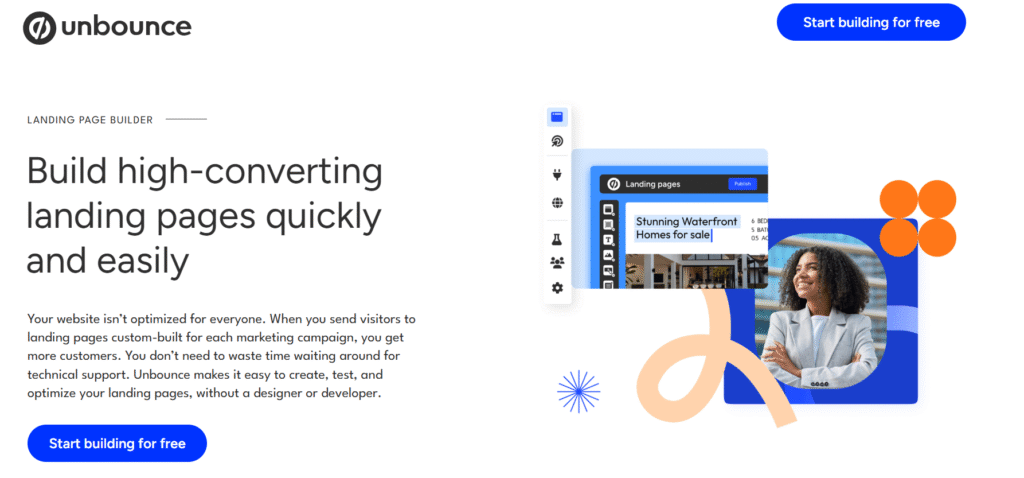
Unbounce grabs attention with its drag-and-drop builder, AI copywriting, and proven conversion-focused templates designed to turn clicks into customers.

Unlock Up to 50% OFF Unbounce 🔥
Supercharge your marketing campaigns with Unbounce! Sign up today and save up to 50% on your first plan. Build high-converting landing pages, run A/B tests, and optimize traffic with AI-powered tools all while keeping costs low. Don’t miss this limited-time offer! 🚀
From startups launching their first campaign to seasoned marketers running A/B tests at scale, it promises speed, flexibility, and better ROI.
But does Unbounce actually deliver measurable results or is it just another landing page tool? Let’s break down its features, pricing, and real-world value to see if Unbounce is the right choice for your marketing goals. 🚀
What Is Unbounce? 💡
Unbounce is a powerful no-code landing page builder designed to help businesses convert more visitors into leads, signups, and customers.
Instead of sending traffic to distracting websites, Unbounce lets you create focused, campaign-specific landing pages that are built purely for conversions.
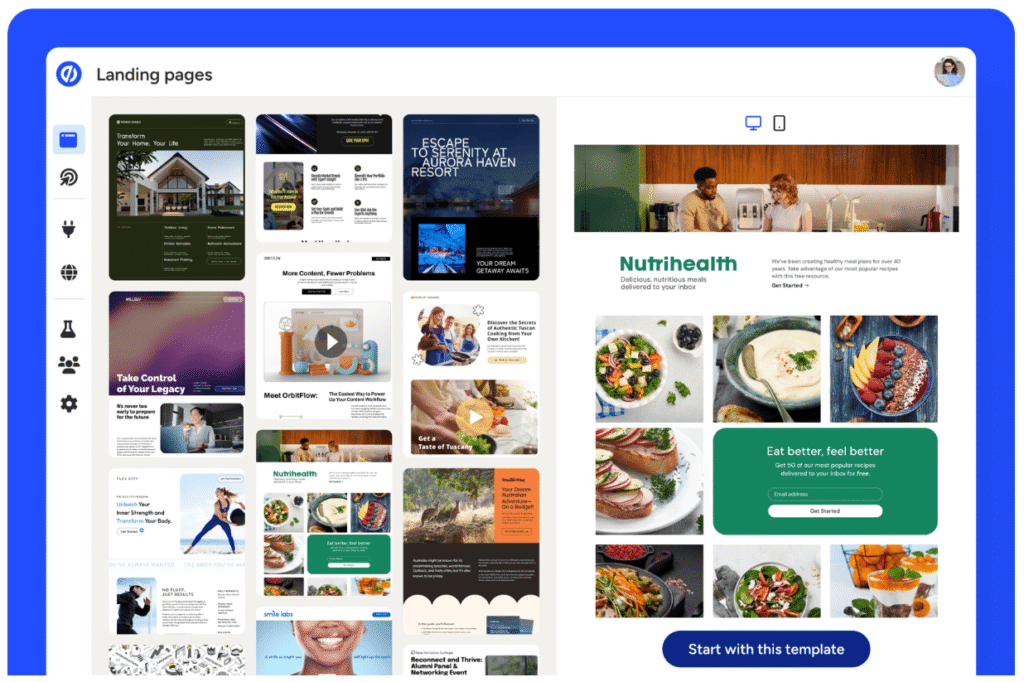
At its core, Unbounce combines an easy drag-and-drop editor with proven conversion tools like popups, sticky bars, A/B testing, and dynamic text replacement.
Marketers can launch pages fast, personalize messaging based on search intent, and continuously optimize performance—without needing a developer or designer.
Unbounce also stands out with built-in AI features, including AI copywriting and AI traffic optimization, which automatically direct visitors to the page variant most likely to convert.
This makes it especially valuable for performance marketers, agencies, SaaS companies, and ecommerce brands focused on maximizing ROI from paid traffic.
Key Features of Unbounce ✨
1. Drag-and-Drop Landing Page Builder
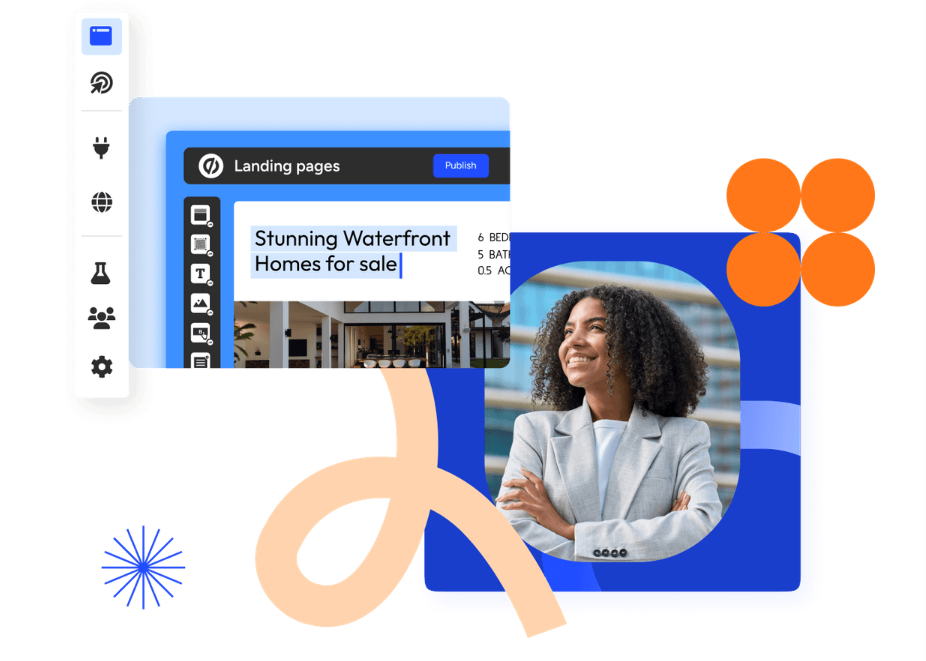
Unbounce offers a powerful drag-and-drop builder that lets you create high-converting landing pages without any coding skills. You can easily customize layouts, images, text, and forms to match your brand. It’s designed for speed and flexibility, helping marketers launch pages quickly. No designer or developer is required.
2. Unlimited Landing Pages and Conversions
With Unbounce, you can create unlimited landing pages across all plans. There are no caps on conversions, allowing your campaigns to scale freely. This makes it easy to run multiple campaigns at the same time. You can focus on growth without worrying about limits.
3. A/B Testing and Experimentation
Unbounce allows you to run unlimited A/B tests to find what converts best. You can test different page variants, headlines, and layouts using real visitor data. Clear reports help you understand performance. This enables smarter, data-driven decisions.

4. AI-Powered Optimization and Copywriting
Unbounce includes built-in AI tools to help generate and improve marketing copy. AI traffic optimization automatically sends visitors to the best-performing pages. These tools reduce guesswork and save time. They help maximize ROI with minimal effort.
5. Dynamic Text Replacement
Dynamic Text Replacement personalizes landing page content based on visitor search terms. This helps align your messaging with user intent. Personalized pages lead to higher engagement and conversions. It is especially effective for paid search campaigns.
6. Popups and Sticky Bars
Unbounce lets you create popups and sticky bars to capture visitor attention. Exit-intent popups help reduce bounce rates. Sticky bars can promote offers or collect leads without disrupting the experience. All elements are fully customizable.
7. Advanced Targeting and Scheduling
You can target visitors based on location, device, or behavior. Unbounce also allows scheduling of pages, popups, and offers. This ensures the right message reaches the right audience at the right time. It improves relevance and performance.
8. Integrations and Customization
Unbounce integrates with over 1,000 marketing tools and platforms. You can connect CRMs, email tools, analytics, and more. Advanced users can add custom scripts, pixels, and code. This makes Unbounce flexible for any tech stack.
How To Get Start With Unbounce? (Step-by-Step)
Step 1: Go to the official website of Unbounce and click on “Start building for free.”
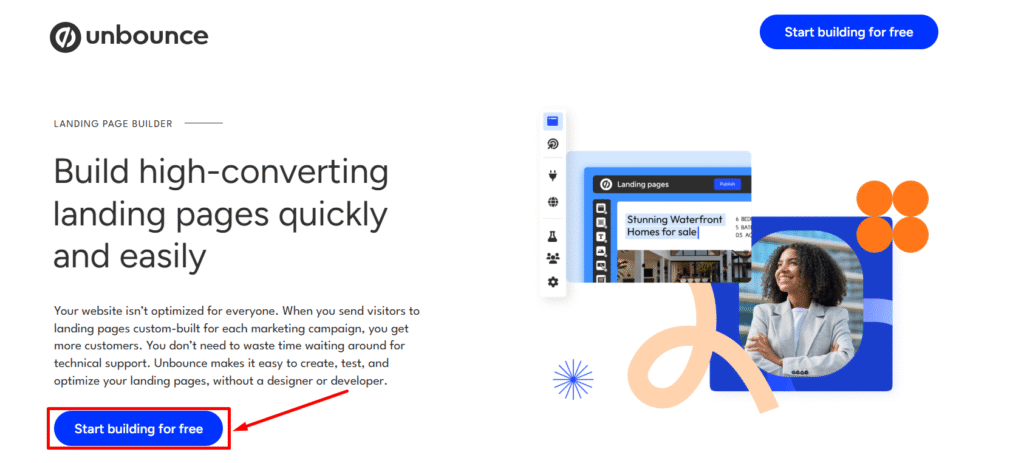
Step 2: Choose your desired plan and click on “Start building for free.”

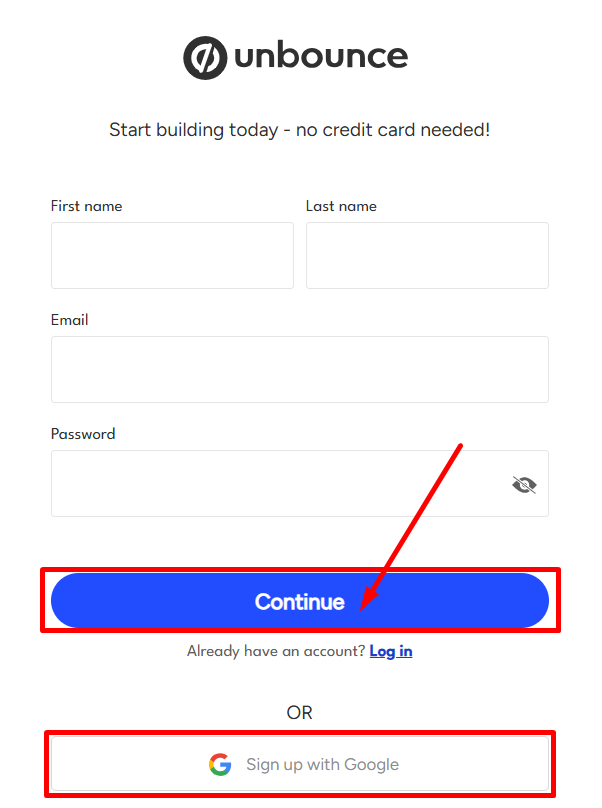
Step 3: Enter your name, email address and set your password. Click on “Continue” to create your Unbounce account.
Step 4: You will receive a verification email. From there verify your email address and start building!

You are all set! Now start building professional landing pages and boost your website traffic.
Pricing Plans of Unbounce 💰
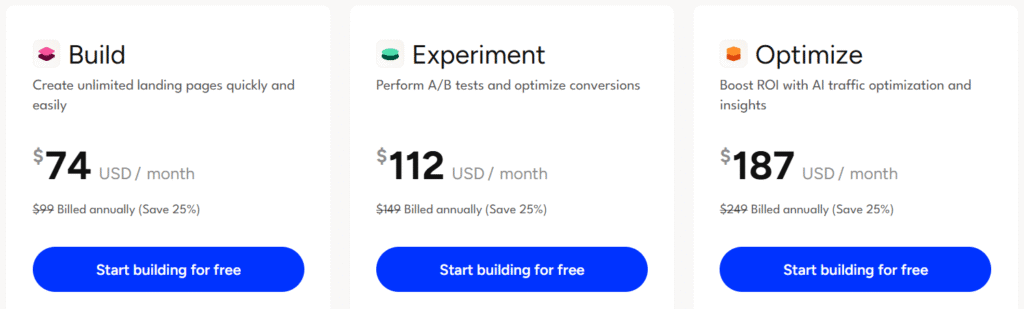
- Build ($74/month) – Quickly create unlimited landing pages using a drag-and-drop builder, popups, sticky bars, and AI-powered copywriting. Perfect for solo users with up to 20k monthly visitors.
- Experiment ($112/month) – Perform unlimited A/B tests with multiple page variants, dynamic text replacement, and detailed conversion insights to optimize performance. Ideal for small teams managing up to 30k visitors.
- Optimize ($187/month) – Boost ROI with AI traffic optimization, advanced targeting, scheduling, and audience insights for data-driven results. Supports larger teams and up to 50k visitors monthly.
Pros & Cons of Unbounce 🚀
| Pros ✅ | Cons ❌ |
|---|---|
| Drag-and-drop builder allows anyone to create landing pages without coding. | Higher monthly cost compared to some competitors. |
| Unlimited landing pages, popups, and sticky bars for flexible marketing campaigns. | Traffic limits on plans may require upgrades as your audience grows. |
| AI-powered copywriting and dynamic text replacement improve conversion rates. | Advanced features like AI optimization only available in higher-tier plans. |
| 100+ high-converting templates save time and ensure professional designs. | |
| Integrates with 1,000+ tools including CRM, email, and analytics platforms. | |
| Built-in A/B testing and conversion insights for data-driven optimization. | |
| Supports multiple users and domains depending on the plan, suitable for teams. | |
| Reliable customer support via phone, email, and live chat for troubleshooting. |
Why Choose Unbounce? 🤩
Unbounce stands out as a powerful platform for marketers who want to quickly create landing pages tailored to their campaigns.
Its tools are designed to simplify design and customization, letting you focus on messaging and conversions rather than technical hurdles.

With built-in analytics and performance insights, Unbounce helps you understand visitor behavior and make data-driven decisions. This ensures that every element of your landing page is optimized to engage users and increase lead generation.
The platform also supports collaboration, allowing teams to work together efficiently on campaigns. Multiple users can manage pages, tests, and variations seamlessly, making it ideal for growing businesses with marketing teams.
Automation and integrations are another key strength. By connecting Unbounce to your existing marketing stack, you can streamline workflows, reduce manual tasks, and improve campaign efficiency across channels.
Unbounce vs Leadpages vs ClickFunnels 💪
| Feature | Unbounce | Leadpages | ClickFunnels |
|---|---|---|---|
| Landing Page Builder | Drag-and-drop with 100+ templates, fully customizable | Drag-and-drop with ready templates, less flexible customization | Primarily funnel-focused; page customization is limited |
| A/B Testing & Optimization | Unlimited A/B testing with AI optimization for better conversions | Basic A/B testing with limited reporting | A/B testing mostly for full funnels rather than single pages |
| Integrations | Supports 1,000+ tools via Zapier and native connections | Limited integrations compared to Unbounce | Strong integrations focused on email and CRM tools |
| Traffic & Conversion Focus | Optimized for high-converting landing pages and popups | Best for lead generation pages and simple campaigns | Funnels optimized for sales and upsells rather than single pages |
| Support | Phone, email, live chat, plus tutorials and templates | Email support and knowledge base | Email and chat support, mostly funnel-focused guidance |
Who Should Use Unbounce? 🌟

Unbounce is perfect for marketers, small business owners, and agencies who want to create high-converting landing pages without relying on developers.
Its drag-and-drop builder and pre-designed templates make it easy for anyone to launch campaigns quickly and professionally.
It’s also ideal for teams that run multiple campaigns and need to experiment with A/B testing or optimize pages using AI-driven insights.
Businesses that want to personalize content for different audiences will benefit from features like dynamic text replacement and advanced targeting.
Agencies and growth-focused companies can take advantage of Unbounce’s integrations with CRMs, email platforms, and analytics tools to automate workflows and track performance.
Essentially, if your goal is to increase leads, signups, or sales through targeted landing pages, Unbounce provides the flexibility, tools, and support to make it happen.
Customer Reviews & Testimonials 🙋🏻♂️

Jack Leach
⭐⭐⭐⭐⭐
Unbounce made building landing pages effortless. The drag-and-drop editor and templates saved us countless hours.

Rollo M.
⭐⭐⭐⭐⭐
The A/B testing features helped us optimize our campaigns quickly. We saw noticeable improvements in conversions.

Kocho S.
⭐⭐⭐⭐
Integrations with our CRM and email tools made campaign automation seamless. It’s a game-changer for our marketing team.
Final Thoughts: Is Unbounce Worth It? 😊
Absolutely! Unbounce is worth it for marketers and businesses serious about driving conversions and maximizing campaign performance. Its intuitive drag‑and‑drop builder and vast library of templates make building landing pages fast and stress‑free, even without technical skills.
Unbounce shines when it comes to optimization. With unlimited A/B testing, dynamic text replacement, and AI‑powered insights, you get tools that help you understand what works and improve results over time. Whether you’re targeting search intent or refining messages for specific audiences, the platform gives you the flexibility and data you need to boost conversions.
The ability to integrate seamlessly with hundreds of apps and CRMs means your landing pages fit neatly into your existing marketing workflow, saving time and reducing manual effort. For teams and agencies, collaboration features and user management further streamline campaign execution.
While it may come at a higher price than basic builders, the value it delivers in terms of advanced optimization, testing capabilities, and performance insights makes Unbounce a strong investment for anyone focused on serious lead generation and campaign ROI.
Quick Links:
- RollerAds Review: Is It Capable of High CTR & Traffic?
- Hostinger Review: Is It Best Hosting Service?
FAQs 📢
Yes! Unbounce integrates smoothly with WordPress via a plugin or by embedding landing pages, making it easy to connect with your existing website.
Absolutely. Unbounce provides a 14-day free trial, allowing you to explore all features and create landing pages without committing upfront.
Yes, all Unbounce landing pages are automatically mobile-responsive, ensuring they look great on any device.
Yes. Unbounce offers built-in analytics and conversion insights to track performance, measure traffic, and optimize landing pages effectively.